• USA Flag Visit our US Store
  • Canada Flag Visit our Canadian Store
  • About Us
  • Contact Us

OptiMediaLabs

Latest Label Industry News

Free Shipping
on orders above $200 »
Phone +1 (888) 646-0573
Sample Label Request Custom Label Quote
  • Home
  • Color Label Printers
  • LX500 Labels
  • LX2000 Labels
  • Lease Calculator for USA USA Flag
  • Lease Calculator for CAN Canada Flag
  • Label Orientation
You are here: Home / Great Ink for Great Labels / Ink Management on the Primera LX910 Printer

Ink Management on the Primera LX910 Printer

February 6, 2020 by Jim Brown

Ink Management on the Primera LX910 Printer

The Primera LX910 color label printer uses a single CMY dye or pigment ink cartridge. You can use either dye or pigment ink cartridges in this printer simply by popping one out and replacing it with the other. No matter which type of ink you prefer to use, it’s smart to actively monitor your LX910 ink levels so you aren’t caught off guard should the printer run low on ink in the middle of a print run. Here’s what you need to know about ink management on the Primera LX910.

  • Get familiar with Primera PrintHub — This utility has several functions including settings, queue, alignment, ink levels, and cost estimator. To access PrintHub, go to Start > Programs > Primera Technology > Primera PrintHub.
  • View the ink levels — Three colored bars, cyan, magenta, and yellow, appear on the first tab of the PrintHub, providing you with a visual display of the printer’s current ink level for each color. Not only will a numeric value show you what percentage of ink cartridge capacity remains, the colored bars will shrink as the corresponding ink colors are consumed.
  • Calculate your ink costs — Before starting a large print job, take a look at the estimated ink costs for your label in the Queue tab. Not only will you get an estimate per label, which is helpful in budgeting and costing your print runs, you’ll also see how many labels you can expect to print using the printer’s current cartridge. You should then be able to determine if the Primera LX910 ink cartridge has enough ink for the entire print run or if you will need to replace it. For example, if you need to print 100 cannabis labels but the ink calculator says you only have enough ink to print 30 of them, it’s nice to know this in advance so that you can replace the ink cartridge before you get started.
  • Low ink warning — If you’re actively managing your Primera ink levels and have spare ink cartridges on hand, a low ink warning shouldn’t be cause for alarm. The low ink warning goes off once the ink level reaches 0 percent. This doesn’t leave you much breathing room, so we recommend ordering extra Primera LX910 ink cartridges so you always have a spare. If you only need to print a handful of labels, you may be able to squeeze a few more prints out of your LX910 ink cartridge. Simply press the Load/Feed button to continue printing. From there, order more Primera LX910 ink cartridges!
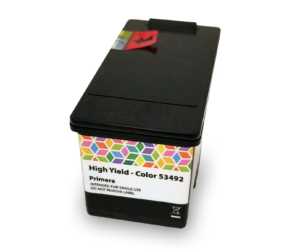
  • Primera 53492 Dye ink cartridge for LX910
  • Primera 53493 Pigment ink cartridge for LX910
  • Primera LX910 labels (all the high gloss paper, glossy polypropylene, polyester labels can be printed with the dye ink. For the pigment ink, we only recommend GHS BS5609 chemical labels, matte paper and polypropylene labels. Glossy labels are not recommended with the pigment ink.

Filed Under: Great Ink for Great Labels, Label Printers, Labels Printer Tagged With: LX910 ink management, Primera LX910

Categories

  • CD and DVD Printer
  • FAQ
  • Great Ink for Great Labels
  • How to make your own labels?
  • Label and Roll Specifications
  • Label Printers
  • Label Software
  • Labels Printer
  • Nutritional Supplements
  • Press Releases
  • Printing Problems
  • Product Promotions and Rebates
  • Uncategorized
  • What type of label is best for my product

Archives

Sign up for our email newsletter

Help Center

  • Login
  • My Account
  • Order Status
  • Shopping Cart
  • Checkout

Company

  • About Us
  • Contact Us
  • Blog
  • Get Free Label Samples
  • Get Free Custom Label Quote
  • Book a Free Printer Demo

Information

  • US Store
  • Canadian Store
  • Shipping Policy
  • Returns & Refund Policy
  • Terms of Use Policy
  • SiteMap

Stay Connected

  • Facebook
  • Twitter
  • LinkedIn
  • Google+
  • Youtube

Paypal, Mastercard and Visa Logo

+1 (888) 646-0573

Click for the BBB Business Review of this Computers Hardware, Software & Services in Vaughan ON
  • Afinia L801 Memjet Labels
  • Afinia R635 Labels
  • Epson TM-C3400 Labels
  • Epson TM-C3500 Labels
  • Epson TM-C7500 Labels
  • Epson TM-C7500G Labels
  • Epson GP-C831 Labels
  • iSys Edge 850 Labels
  • iSys Apex 1290 Labels
  • Memjet Labels
  • Primera LX400 Labels
  • Primera LX500 Labels
  • Primera LX900 Labels
  • Primera LX2000 Labels
  • Primera CX1000 Labels
  • Primera CX1200 Labels
  • VIPColor VP485 Labels
  • VIPCOlor VP495 Labels
  • VIPColor VP700 Labels
  • Afinia L801 Memjet Ink Cartridges
  • Afinia R635 Toner Cartridges
  • Epson TM-C3400 Ink Cartridges
  • Epson TM-C3500 Ink Cartridges
  • Epson TM-C7500 GHS Ink Cartridges
  • Epson TM-C7500G Ink Cartridges
  • Epson GP-C831 Ink Cartridges
  • iSys Edge 850 Toner Cartridges
  • iSys Apex 1290 Toner Cartridges
  • Primera LX400 Ink Cartridges
  • Primera LX500 Ink Cartridges
  • Primera LX900 Ink Cartridges
  • Primera LX2000 Ink Cartridges
  • Primera CX1000 Toner Cartridges
  • Primera CX1200 Toner Cartridges
  • VIPColor VP485 Ink Cartridges
  • VIPColor VP495 Ink Cartridges
  • Color Label Printers
  • Label Applicator
  • Label Dispensers
  • Label Finisher
  • Label Rewinders & Unwinders
  • Label Slitter
  • Label Software
  • Matrix Removal System

© Copyright 2018 Optimedia Labs Incorporated. All Rights Reserved.

USA FlagAll prices and charges are in US Dollar. To shop in Canadian dollars click here

Privacy Notice

MENU
  • Home
  • Color Label Printers
  • LX500 Labels
  • LX2000 Labels
  • Lease Calculator for USA USA Flag
  • Lease Calculator for CAN Canada Flag
  • Label Orientation